Mercury Space Simulator2.0.4
Publisher Description
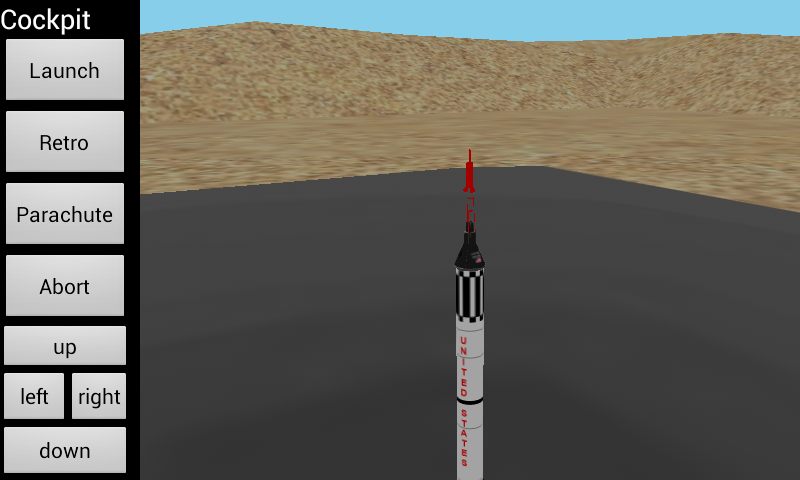
The Mercury Space Simulator is a 3D Space Simulator where you can take control of the Mercury Capsule.
This Simulator offers you a lot of functions for a realistic Space feeling.
The App is based on the first space program of the United States wich send human to space.
Get the latest information on the official Facebook page: https://www.facebook.com/pages/Mercury-Space-Simulator/220216791399349 or at http://appboss.de
Comming up in the next update:
Built your own Rocket from a lot of parts like fuel tanks, decouplers and fins!
->How to use<-
Buttons:
Launch - Press to launch the rocket. Press again to reset.
Retro - Press to fire the retro rockets to return to earth
Parachute - Deploys the parachute.
Abort - Aborts a Launch with the Launch Escape System
How to launch:
-Press the "Launch" Button
-Rocket is now on the way to space.
-When the rocket is in space, the rocket and the escape tower seperates from the capsule.
-Now you can control the pitch an yaw with the buttons
-To return to earth you can press teh retro button to start the retro rockets.
-Deploy the parachute with the "Parachute" button. Take care to fire it not too late.
About Mercury Space Simulator
The company that develops Mercury Space Simulator is AppBoss. The latest version released by its developer is 2.0.4. This app was rated by 1 users of our site and has an average rating of 4.0.
To install Mercury Space Simulator on your Android device, just click the green Continue To App button above to start the installation process. The app is listed on our website since 2014-01-06 and was downloaded 44 times. We have already checked if the download link is safe, however for your own protection we recommend that you scan the downloaded app with your antivirus. Your antivirus may detect the Mercury Space Simulator as malware as malware if the download link to com.appboss.mercurysim is broken.
How to install Mercury Space Simulator on your Android device:
- Click on the Continue To App button on our website. This will redirect you to Google Play.
- Once the Mercury Space Simulator is shown in the Google Play listing of your Android device, you can start its download and installation. Tap on the Install button located below the search bar and to the right of the app icon.
- A pop-up window with the permissions required by Mercury Space Simulator will be shown. Click on Accept to continue the process.
- Mercury Space Simulator will be downloaded onto your device, displaying a progress. Once the download completes, the installation will start and you'll get a notification after the installation is finished.
Program Details
System requirements
Download information
Pricing
Version History
version 2.0.4
posted on 2014-01-06
- Prepared for the new "build your own Rocket" feature,- Bug fixes
version 1.11
posted on 2012-02-09
Several fixes and updates
